

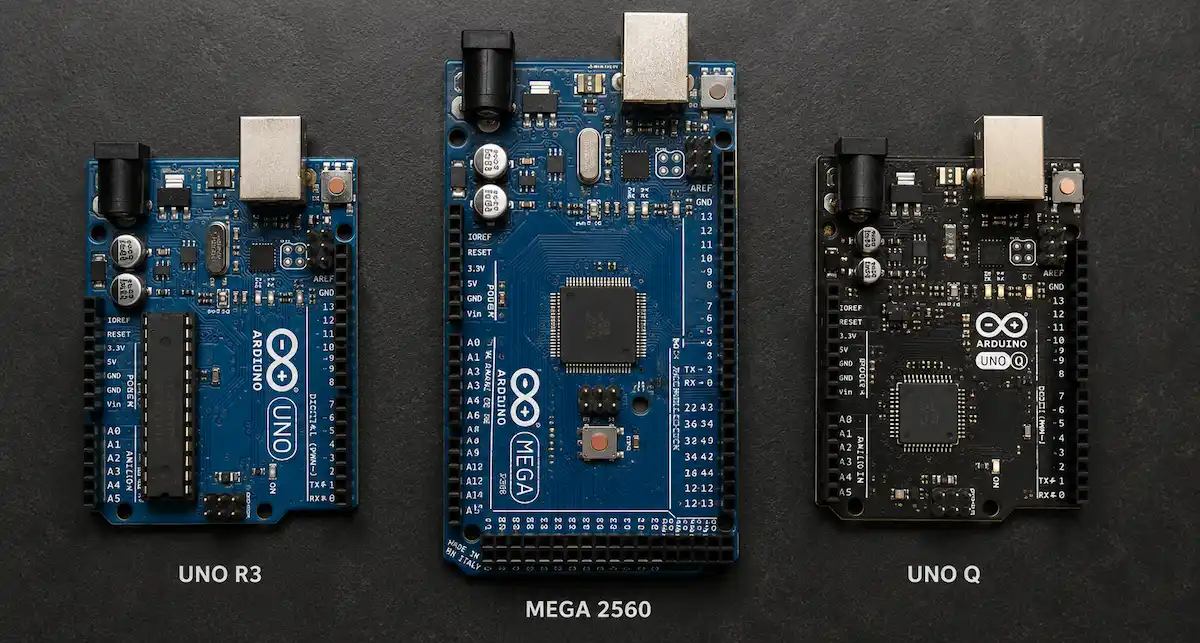
Arduino Mega 2560 vs Uno: Which Board Should You Choose in 2026?
The Arduino Uno and Arduino Mega 2560 answer the same question — "which board do I build this on?" — with very different tradeoffs. The Uno is compact, cheap, and has been the default starting board for over a decade. The Mega trades that compactness for far more I/O: more digital pins, more analog inputs, more UARTs, more memory.
That comparison used to be the whole story. It no longer is. In October 2025, Arduino entered an agreement to join Qualcomm Technologies, and the first product out of that partnership — the Arduino UNO Q — is a genuinely different kind of board: a Linux-capable microprocessor and a real-time microcontroller on a single UNO-form-factor PCB. It doesn't replace the Uno or the Mega, but it changes what "which Arduino should I use" means for anyone considering edge AI or vision workloads.
This guide compares all three on the metrics that actually decide a board choice — pin count, memory, architecture, connectivity, and cost — so the right choice for a specific project is clear.
The Classic AVR Line: Uno and Mega
Both the Uno R3 and the Mega 2560 run on 8-bit AVR microcontrollers (the ATmega328P and ATmega2560 respectively). They're not being replaced by the UNO Q — they're a different tool for a different job. If a project is single-purpose and doesn't need Linux, a networked dashboard, or ML inference, an AVR board remains cheaper, simpler to debug, and more power-efficient than a Linux SBC.
Arduino Uno R3
The Uno is the standard entry point into embedded electronics: single-threaded, breadboard-friendly, and backed by the largest library of community code and tutorials of any hobbyist board. It's designed for straightforward operations, not scale.
Where the Uno R3 fits:
- First projects — SolderHub's Getting Started with Arduino Uno R3 — LED Blink Guide covers the path from unboxing to a working circuit.
- Basic sensor integration — weather stations and clocks built on DHT11/DHT22 sensors, a DS3231 RTC module, and a 16x2 LCD sit comfortably within its 14 digital / 6 analog pin budget.
- Education — it remains the standard board for teaching electronics fundamentals in schools and makerspaces.
Arduino UNO Q
The UNO Q keeps the Uno's physical footprint and shield headers but replaces what's underneath. It pairs a Qualcomm Dragonwing QRB2210 microprocessor — quad-core, running a full Debian Linux environment — with an STM32U585 microcontroller (Arm Cortex-M33) handling real-time I/O over Zephyr RTOS. Arduino describes this as a "dual-brain" design: the Linux side handles AI models, video, and networking, while the microcontroller side handles the deterministic, low-latency tasks an RTOS is built for.
What it's for
Through Arduino App Lab, the UNO Q runs Python and containerized AI models on the Linux side alongside conventional Arduino sketches on the microcontroller side, coordinated over a built-in RPC bridge. That combination is aimed squarely at edge AI and vision workloads that a plain AVR board can't touch: local object detection, sound recognition, and real-time vision inspection, without offloading to the cloud.
It's not a hypothetical use case. PriscoZen's ZenCell quality-inspection system originally ran a Mega 2560 for I/O paired with a Raspberry Pi for machine logic and vision. Rebuilding it around a single UNO Q cut cycle times from roughly 2 seconds to under 0.7 seconds by removing the board-to-board handoff entirely. Star Stream, a motorsport telemetry project, uses the same architecture to process high-speed racing data at the edge.
Arduino Mega 2560
The Mega 2560 solves one specific problem: the Uno running out of pins. Once a project needs to drive more than a handful of relays, read several sensors simultaneously, and talk to more than one serial peripheral at once, the Mega's extra I/O stops being a nice-to-have.
For a full pin-by-pin breakdown, see SolderHub's Ultimate Arduino Mega 2560 Pinout Guide.
What the extra I/O buys:
| Feature | Detail |
|---|---|
| 54 Digital I/O Pins | Drive dozens of relays, LEDs, or sensors without external multiplexing |
| 16 Analog Inputs | Read multiple sensors — potentiometers, moisture probes, light sensors — simultaneously |
| 15 PWM Pins | Independent speed/brightness control for multiple motors, servos, or LED strips |
| 4 Hardware UARTs | Serial, Serial1, Serial2, Serial3 — talk to a GPS module, Bluetooth, and RFID reader at the same time, no SoftwareSerial |
| SPI + I2C | Daisy-chain displays and sensor modules on the same bus |
| 6 External Interrupts | React immediately to limit switches, rotary encoders, or e-stop triggers |
Head-to-Head Comparison
I/O and Scalability — Mega 2560
With 54 digital pins, 16 analog inputs, and 4 hardware serial ports, the Mega is the only one of the three built for projects with a large physical footprint — dozens of relays, multiple simultaneous sensor reads, several displays at once. The Uno can be expanded with shift registers or I2C GPIO expanders, but that adds wiring and firmware complexity the Mega avoids by default.
Processing Architecture — UNO Q
The Uno R3 and Mega 2560 both run 8-bit AVR cores: reliable and low-power, but not built for floating-point math, image processing, or high-throughput data handling. The UNO Q's dual-core design — a quad-core Linux application processor alongside a dedicated real-time microcontroller — is a different class of hardware for workloads that need both.
AI and Vision — UNO Q
This is the clearest gap. Neither the Uno nor the Mega can run a vision model or process a video stream on-board; the usual workaround is offloading that processing to a separate board (often a Raspberry Pi) while the AVR board handles motors and sensors. The UNO Q folds both roles into one board, which is exactly the consolidation PriscoZen made with ZenCell.
Cloud and Connectivity — UNO Q
The UNO Q integrates with Arduino Cloud out of the box, with Wi-Fi and Bluetooth built in. Getting a Mega or Uno online requires an add-on — typically an Ethernet shield or an ESP8266/ESP32 module — which works fine but is an extra component and a bit more wiring than a board with networking built in.
Quick Spec Reference
| Feature | Uno R3 | Mega 2560 | UNO Q |
|---|---|---|---|
| Digital I/O | 14 | 54 | UNO-form headers |
| Analog Inputs | 6 | 16 | Via headers |
| PWM Pins | 6 | 15 | Via MCU headers |
| Hardware UARTs | 1 | 4 | Multiple (MCU side) |
| Flash Memory | 32 KB | 256 KB | 16 GB eMMC (Linux side) |
| Architecture | 8-bit AVR | 8-bit AVR | Quad-core Cortex-A53 + Cortex-M33 |
| On-board AI / Vision | No | No | Yes (Edge Impulse, local models) |
| Cloud Integration | Via add-on | Via add-on | Native (Wi-Fi + Arduino Cloud) |
Choose the Uno R3 when:
- Building a first project or following a beginner tutorial
- The build is a single sensor node — a DHT22 weather station, a DS3231 clock, a basic OLED display
- Budget and shield/library compatibility matter more than pin count
Choose the Mega 2560 when:
- Building a 3D printer or CNC controller — Marlin firmware targets it natively
- Driving 18+ servos for a hexapod or multi-axis arm
- Running a greenhouse or automation rig with many relays, pumps, and sensors on one board
- The project simply needs more pins than any single-MCU alternative offers
Choose the UNO Q when:
- Running TinyML or vision models locally, without a cloud round-trip
- Building an inspection or monitoring system that currently needs two boards (an AVR board plus a Raspberry Pi, for example)
- Networked telemetry and Arduino Cloud integration need to work out of the box
- The project is stepping from hobbyist prototyping into something closer to a production deployment
Simulating Before Wiring Anything Up
Whichever board fits, wiring mistakes and mismatched voltage levels are easier to catch before hardware is involved. SolderHub embeds a live Wokwi simulator on project pages so a circuit — Mega with 20 relays, Uno with a sensor stack, or UNO Q running a vision pipeline — can be built and tested in the browser before any part is ordered.
The Bottom Line
This isn't a "best board" question — it's a "right tool for the job" question:
- Uno R3 for learning the fundamentals and building simple, single-purpose sensor nodes.
- Mega 2560 for projects that need more pins than anything else can offer — 3D printers, large sensor arrays, multi-relay automation.
- UNO Q for projects that need on-device AI, vision, or native cloud connectivity without stitching together two separate boards.
For the full pin map on the Mega, see the Ultimate Arduino Mega 2560 Pinout Guide.