
What You'll Build
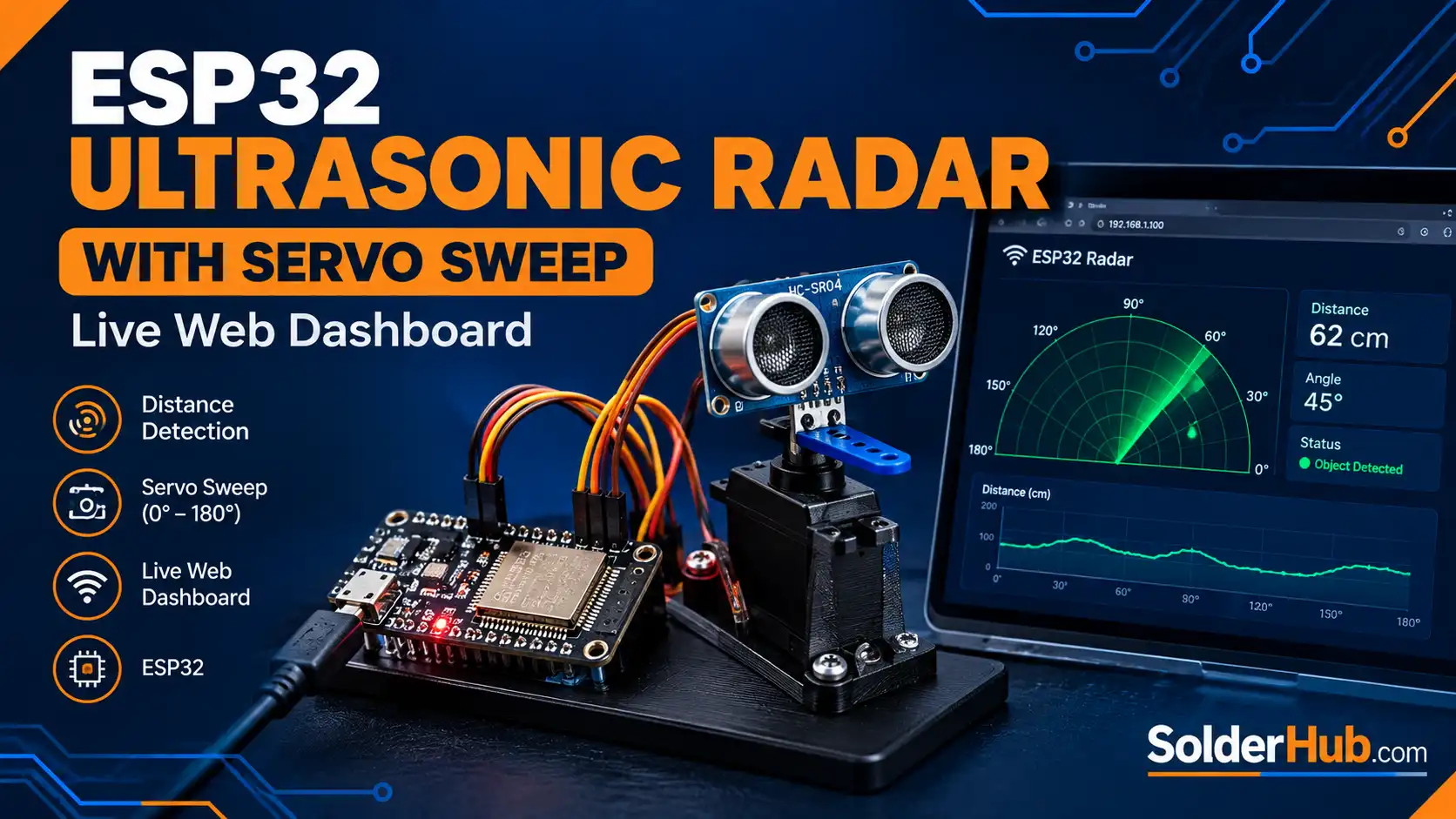
A classic sweep radar — the kind you've seen in submarine movies and airport control towers — built from three components you can source for well under $10: an ESP32, an SG90 micro servo, and an HC-SR04 ultrasonic distance sensor. The servo sweeps the ultrasonic sensor back and forth across a 150° arc. At every step the ESP32 fires a pulse, times the echo, and calculates distance. That angle/distance pair is pushed to a live web dashboard rendered entirely in HTML5 canvas — a green sweeping line, a grid of range rings, and fading red blips wherever the sensor detects an object.
What makes this build worth doing, beyond looking great on a desk, is the systems-level skill it teaches: real-time sensor sampling synchronized with actuator position, a lightweight JSON API served directly from the microcontroller, and browser-side rendering that polls and animates independently of the network. No app, no cloud service, no external hosting — open a browser on any device on the same Wi-Fi network and the radar is live.
How the System Works
The project has three loosely coupled layers, and understanding the boundary between them is the key to getting a project like this right:
1. The sensing loop (on-chip, real time). Every SETTLE_MS milliseconds, the ESP32 moves the servo one step, waits for it to settle, then fires the HC-SR04 and times the echo with pulseIn(). The result — an angle and a distance — is written to two volatile globals. This loop runs continuously regardless of whether anyone is looking at the dashboard.
2. The web server (request/response). The ESP32 runs a WebServer instance on port 80. It serves two routes: / returns the full HTML/CSS/JS page (stored in flash via PROGMEM, so it costs zero RAM at runtime), and /data returns a tiny JSON object — {\"angle\":90,\"distance\":34.2} — built fresh from the current globals on every request. Because server.handleClient() is called on every pass through loop(), the server stays responsive even while the sensing loop is running.
3. The browser (polling + animation). The page's JavaScript polls /data every 100 ms using fetch(), decoupled entirely from the ESP32's own sweep timing — the browser doesn't need to be told when a new reading exists, it just asks. A requestAnimationFrame loop redraws the canvas at the display's native refresh rate, independent of the polling rate, so the sweep line and range rings stay smooth even on a slow Wi-Fi link. Detected objects are stored as timestamped 'blips' in a JavaScript array and fade out over three seconds — that decay is pure client-side math, the ESP32 never needs to know about it.
This sense / serve / render separation is worth internalizing — it's the same pattern used in production dashboards for far more complex hardware.
🚨 Danger
The SG90 servo draws up to 600 mA under load — well beyond what the ESP32's onboard 3.3V regulator or a USB port can reliably supply alongside Wi-Fi's current spikes. Power the servo from a separate 5V source (a bench supply, or an 18650/4×AA pack through a 5V regulator) and tie its ground to the ESP32's GND. Do not run the servo's power rail from the ESP32's 3.3V or 5V pin.
Components
9 itemsNeed these parts? Get this build sheet by email
Parts list with buy links, plus new builds as they're published. By subscribing you agree to our Privacy Policy. Unsubscribe anytime.
Wiring
| Component | Pin | ESP32 GPIO |
|---|---|---|
| HC-SR04 | VCC | 5V (VIN) |
| HC-SR04 | TRIG | GPIO5 |
| HC-SR04 | ECHO | GPIO18 (through divider) |
| HC-SR04 | GND | GND |
| SG90 Servo | Signal (orange) | GPIO13 |
| SG90 Servo | V+ (red) | External 5V |
| SG90 Servo | GND (brown) | External GND, tied to ESP32 GND |
Mount the HC-SR04 on the servo horn with a small 3D-printed or hot-glued bracket, sensor face pointing outward along the servo's rotation axis. Leave the sensor's wires slack enough to travel the full 150° sweep without pulling on the connector.
🚨 Danger
The HC-SR04's ECHO pin outputs a 5V logic pulse. The ESP32's GPIO pins are rated for 3.3V max — connecting ECHO directly can damage the input immediately or degrade it over time. Build a simple divider: ECHO → 1 kΩ resistor → ESP32 GPIO18, then a 2 kΩ resistor from that same junction to GND. This drops the 5V pulse to roughly 3.3V (5V × 2k/(1k+2k) = 3.33V), safe for the ESP32 input. TRIG can connect directly — the ESP32 drives it, so it only ever outputs 3.3V, comfortably above the HC-SR04's logic-high threshold.
Sweep Resolution, Timing, and the JSON Contract
Two constants control the trade-off between smoothness and speed: STEP_DEG (degrees per step, default 2°) and SETTLE_MS (settle time before each ping, default 25 ms). A full 150° sweep at these defaults takes roughly (150/2) × 25 ms ≈ 1.9 seconds one-way. Push STEP_DEG down to 1° for a denser sweep at the cost of speed, or raise SETTLE_MS if you see spurious echo readings caused by the sensor still vibrating from the servo's last move — HC-SR04 modules are surprisingly sensitive to mechanical settling time.
The distance calculation itself is standard time-of-flight: distance_cm = duration_us × 0.0343 / 2. The constant 0.0343 cm/µs is the speed of sound at roughly 20°C; dividing by 2 accounts for the pulse traveling to the object and back. pulseIn() is called with an explicit 25 ms timeout — without it, a missing echo (open air beyond the sensor's ~4 m range) blocks the entire loop indefinitely, freezing both the sweep and the web server.
The /data endpoint intentionally returns the bare minimum: current angle and current distance, nothing else. There's no history, no buffering, no WebSocket handshake. This keeps the ESP32's memory footprint tiny and makes the endpoint trivially easy to consume from anything — curl, a Python script, Node-RED, or the canvas dashboard built here. If you want a persistent sweep history later, that's a job better handled by the browser (as this project does with its blips array) than by the microcontroller's limited RAM.
Reading the Front-End Code
The entire dashboard — markup, styling, and logic — lives inside the INDEX_HTML string in flash memory, so the ESP32 needs no SPIFFS, LittleFS, or SD card to serve it. Three functions do the visual work:
drawGrid()draws four concentric range arcs and six angle spokes across the 180° field, using the canvas 2D API'sarc()and basic trigonometry to convert degrees to x/y coordinates.drawSweep(angleDeg)draws the rotating sweep line with a linear gradient — bright green at the pivot, fading to near-transparent at the tip — which gives it the classic CRT-radar look.drawBlips()iterates a rolling array of detected objects, computing each one's on-screen position from its stored angle and scaled distance, and fades its opacity based on how long ago it was detected (a three-second decay, hardcoded but easy to change).
The render loop and the network poll loop are deliberately separate requestAnimationFrame and setTimeout chains. This means a slow or dropped /data request never causes the sweep animation to stutter — the canvas just keeps redrawing with the last known angle until fresh data arrives.
Steps
- 1Install the ESP32Servo library via Library Manager (by Kevin Harrington / madhephaestus)
- 2Wire the HC-SR04 with the voltage divider on ECHO, and power the SG90 from its own 5V supply while sharing GND with the ESP32
- 3Paste the sketch, set your Wi-Fi SSID and password, and select board: ESP32 Dev Module
- 4Upload, then open Serial Monitor at 115200 baud to read the ESP32's assigned IP address
- 5Open that IP address in a browser on any device on the same network — the radar sweep should start immediately
- 6Wave a hand or hold a book in front of the sensor at different angles to confirm blips appear and fade correctly
Calibration and Accuracy Notes
The HC-SR04 has real limitations worth knowing before you trust its readings: a roughly 15° effective detection cone (narrower than its 30°+ physical shape might suggest), poor performance against soft or angled surfaces that absorb or deflect the pulse rather than reflecting it straight back, and a practical minimum range around 2 cm. For radar-style sweeps specifically, expect 'ghost' readings near the edges of the sweep where the servo horn or wiring briefly enters the sensor's own field of view — if you see a suspiciously consistent blip at the same angle on every pass, that's almost certainly the culprit, and the fix is a slightly larger standoff bracket rather than a code change.
The 0.0343 cm/µs constant assumes roughly 20°C air temperature; the speed of sound changes by about 0.06% per °C. For desk and hobby-robotics use this is well within acceptable error, but for anything needing sub-centimeter accuracy across large temperature swings, pair the HC-SR04 with a cheap DS18B20 temperature sensor and recompute the constant as (331.3 + 0.606 × tempC) m/s, divided by 10,000 to get cm/µs.
Troubleshooting
- Dashboard loads but distance always reads
--— check the voltage divider wiring on ECHO; a wrong resistor value or a broken connection meanspulseIn()times out on every call. - Servo jitters or resets the ESP32 — this is almost always a shared power rail. The servo's stall current spikes can brown out the ESP32's regulator; move the servo to its own 5V supply and share only ground.
- Web page loads once then stops updating — open the browser console; a
fetch()error there usually means the ESP32 rebooted (often the same brownout issue above) and dropped its Wi-Fi connection. - Sweep is jerky rather than smooth — increase
SETTLE_MS; cheap SG90 clones can take longer than 25 ms to physically settle at each step, and pinging mid-motion produces noisy readings that make the sweep line appear to stutter on the dashboard. - Readings drift or seem inconsistent room to room — this is expected; humidity and temperature both affect the speed of sound, and hard versus soft surfaces reflect ultrasonic pulses very differently.
Going Further
- Log every (angle, distance, timestamp) reading to an SD card or push it to a service like InfluxDB for a persistent radar history instead of the three-second fade
- Swap the single-axis sweep for a pan/tilt bracket with two servos for a crude 3D point-cloud scanner
- Replace the HC-SR04 with a VL53L0X or VL53L1X time-of-flight sensor over I²C for a tighter beam width and better accuracy against soft or angled targets
- Add a WebSocket endpoint alongside
/datafor push-based updates instead of polling, cutting both latency and unnecessary HTTP overhead - Trigger a buzzer or relay when an object is detected inside a configurable distance threshold, turning the radar into a simple intrusion-alert system
Frequently Asked Questions
Can I use an SG90 clone, or does it need to be a genuine Tower Pro servo?
Any 5V analog hobby servo with standard 500–2400 µs pulse timing works. Clones are fine — just be aware cheaper clones tend to have looser gearing, which shows up as slightly jerkier sweeps and may need a higher SETTLE_MS value.
Does this work on an ESP8266 instead of an ESP32?
Not without changes. The ESP32Servo library and the WebServer.h API used here are ESP32-specific. An ESP8266 port would need Servo.h (which behaves differently on ESP8266's single PWM-capable timer) and ESP8266WebServer.h. The HC-SR04 wiring and voltage-divider requirement stays the same either way, since the ESP8266 is also a 3.3V-logic chip.
What's the maximum reliable range? The HC-SR04 is rated to about 4 m, but reliable readings against a typical flat, hard surface top out closer to 3–3.5 m in practice. Soft, angled, or very small objects will read shorter or drop out entirely well before that.
Can I run this on battery power instead of USB? Yes — power the ESP32 from a 5V source (like a USB power bank) at its VIN pin, and keep the servo on its own separate 5V rail as described in the wiring section. Running both the ESP32 and servo off the same small battery is the single most common cause of random resets in this kind of build.
Why does the dashboard show old data if I close and reopen the browser tab?
It won't — the blips array and sweep angle live entirely in that tab's JavaScript memory, so a fresh tab starts empty and repopulates from live /data polls within a second or two. There's no server-side session state to go stale.
Can multiple browsers/devices view the dashboard at the same time?
Yes. Each browser independently polls /data, and the ESP32's WebServer can serve multiple concurrent short-lived requests without issue. The sweep itself is a single physical servo, so every viewer sees the same real-world sweep, just rendered independently on each screen.


