Building Tiny AI Robotic Heads Using ESP32-S3
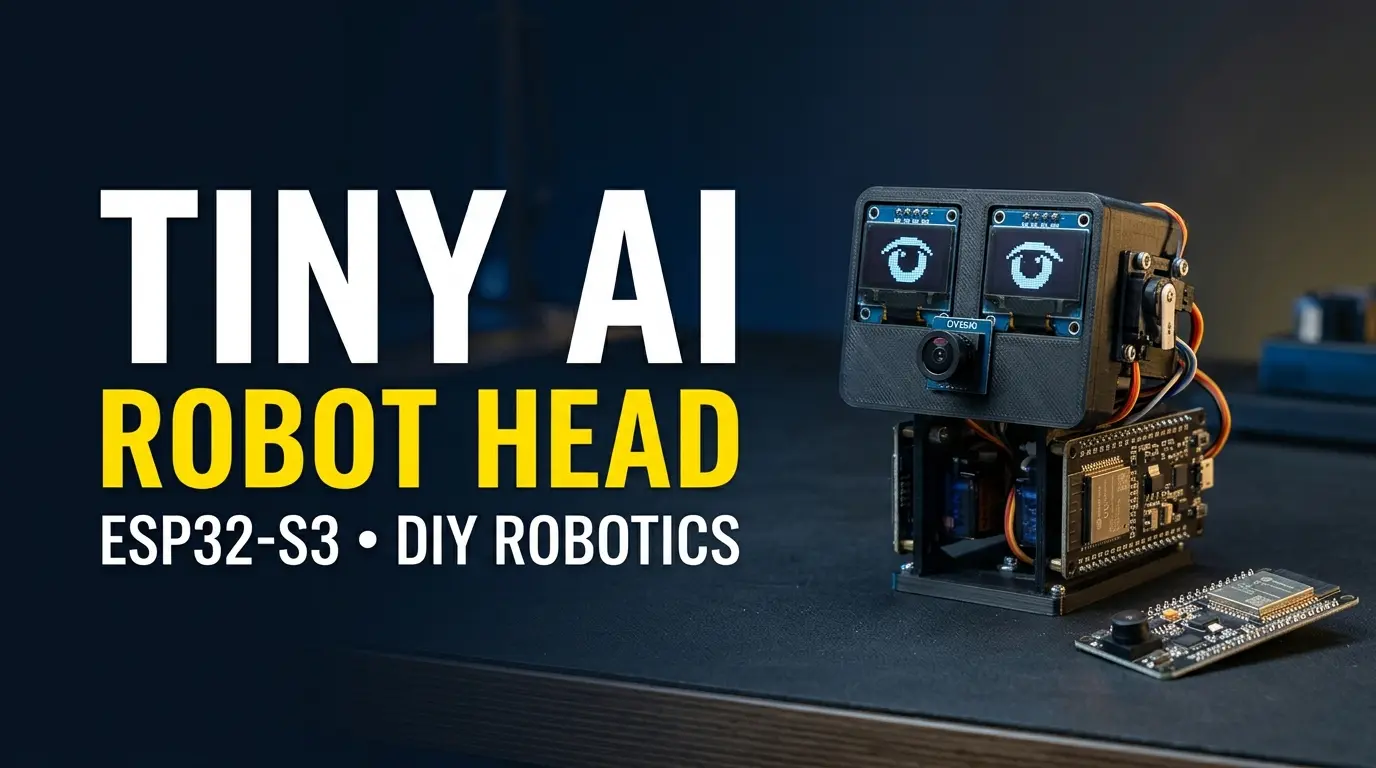
Most ESP32 "AI" projects stop at a chatbot on a screen. This one goes further: it gives a small embedded device a face, a voice and a memory of its own. The result is two desk-sized robotic heads running different personalities. ESP is a calm health-information assistant, and Jason is a terse developer assistant. The hardware and firmware are identical. What differs is the persona the backend attaches to each device, and the small knowledge base it retrieves from.
It is a complete voice pipeline: button-triggered recording, speech-to-text, retrieval of persona-specific context, an LLM reply, text-to-speech, and an OLED face whose mouth moves in time with the audio. This guide gives you a valid ESP32-S3 pin map, the firmware for the head and a reference backend.
Why an ESP32-S3 and Not a Raspberry Pi?
An ESP32-S3 cannot run a large language model, and that is not its job here. It is an excellent cheap, low-power voice front end: it has two I2S controllers for a microphone and a speaker, Wi-Fi, a native USB port, and optional 8 MB of PSRAM to buffer audio. The intelligence lives on a small backend server, a Raspberry Pi 4 or any inexpensive VPS, that the head reaches over Wi-Fi. That keeps each unit cheap enough that building two personalities costs less than one overpowered board.
What Runs Where
Be clear about where each step happens, because it decides your privacy and what works offline.
| Step | Runs on | Needs network? |
|---|---|---|
| Wake button, recording, silence detection | The ESP32-S3 | No |
Speech-to-text (Whisper, tiny.en) | Your backend server | LAN only |
| Retrieval from the persona's notes | Your backend server | LAN only |
| The language model reply | Whichever OpenAI-compatible endpoint you configure. A local server keeps it on your LAN, a hosted API sends the text out | Depends on your choice |
| Text-to-speech (Piper) | Your backend server | LAN only |
| Playback and face animation | The ESP32-S3 | No |
The microphone is only active between a button press and the end of the utterance. The raw audio goes to your backend and is not stored by the code in this guide. Only the transcribed text is sent to the language-model endpoint. Without the backend or Wi-Fi, the head can show its face but it cannot answer.
Components
11 itemsNeed these parts? Get this build sheet by email
Parts list with buy links, plus new builds as they're published. By subscribing you agree to our Privacy Policy. Unsubscribe anytime.
⚠️ Warning
**Use the MAX98357A, not a PAM8302.** The PAM8302 is an *analog* amplifier and expects an audio waveform on its input. The ESP32-S3 has **no DAC**, and an I2S digital stream fed into a PAM8302 produces only noise. The MAX98357A takes the I2S signal directly and drives the speaker.
Wiring
Both robots use identical wiring. Only the Wi-Fi credentials and the DEVICE_ID in the firmware differ.
Choosing Safe ESP32-S3 Pins
The ESP32-S3 pin map is not the same as the classic ESP32's. GPIO 22 to 25 do not exist on the S3, and on an N16R8 module GPIO 26 to 32 are used by the flash and GPIO 33 to 37 by the octal PSRAM, so they must never be assigned. GPIO 0, 3, 45 and 46 are strapping pins, and GPIO 19 and 20 are the USB data lines. The pins below avoid all of these and are safe on N16R8 boards. Mini boards vary, so confirm against your own board's pinout before soldering.
| Function | Signal | ESP32-S3 GPIO |
|---|---|---|
| INMP441 mic | SCK (bit clock) | 5 |
| INMP441 mic | WS (word select) | 4 |
| INMP441 mic | SD (data out) | 6 |
| MAX98357A amp | BCLK | 15 |
| MAX98357A amp | LRC (word select) | 16 |
| MAX98357A amp | DIN | 7 |
| OLED SSD1306 | SDA | 8 |
| OLED SSD1306 | SCL | 9 |
| Wake button | other leg to GND, INPUT_PULLUP | 10 |
Power and Grounding
- INMP441: VDD to 3V3, GND to GND, and L/R to GND, which selects the left channel. Left floating, the channel is undefined and you may record only zeros.
- MAX98357A: VIN to the battery or 5 V rail, not the 3.3 V rail. A speaker draws sharp current peaks, and on a 3.3 V rail those peaks pull the supply down and can reset the ESP32. Place a 100 µF capacitor across VIN and GND close to the amplifier. VIN accepts 2.7 to 5.5 V, so a LiPo is fine. Leave the SD and GAIN pins at their breakout defaults, which give a mono mix at about 9 dB.
- Speaker: to the amplifier's output terminals, 4 to 8 Ω.
- All grounds must be common. Keeping the microphone and the amplifier on the same ground reference while giving the amplifier its own supply wire is what prevents hum, whereas separate supplies without a shared ground cause it.
- Charging: battery through the TP4056 module, with a slide switch between the battery and the load. Never leave a LiPo charging unattended.
Arduino IDE Setup for the N16R8
The firmware targets Arduino-ESP32 core 3.x and uses its built-in ESP_I2S library, because the older driver/i2s.h API is deprecated in current cores. Install esp32 by Espressif Systems from the Boards Manager and the Adafruit SSD1306 and Adafruit GFX libraries. Then set:
- Board: ESP32S3 Dev Module
- Flash Size: 16 MB
- PSRAM: OPI PSRAM. An N16R8 has octal PSRAM, and with the wrong setting
ps_malloc()returns NULL - USB CDC On Boot: Enabled, if you want the Serial Monitor over the native USB port
The Conversation Pipeline
- Idle. The OLED shows a blinking face and the board waits for the wake button.
- Listening. A button press starts the microphone. Audio is read into a PSRAM buffer for up to five seconds. A simple RMS-based voice-activity check learns the room's noise floor, waits for speech, and stops after about 640 ms of silence.
- Upload. The raw 16 kHz, 16-bit mono PCM is POSTed to the backend's
/converseendpoint with anX-Device-Idheader. - Speech-to-text. The backend transcribes it with Whisper. The
tiny.enmodel typically handles a short clip in a second or two on a Pi 4, while larger models are much slower. - Retrieval. The text is embedded and matched against that persona's small vector store. This is the real source of personality: the same model gets different retrieved notes and a different system prompt per device.
- Language model. The notes and the question go to the model with a short system prompt. ESP is calm and always refers serious problems to a real doctor. Jason is terse and comfortable with jargon.
- Text-to-speech. Piper turns the reply into 16 kHz PCM and the backend returns it in one response with a known length.
- Speaking. The head plays the audio through the amplifier while a second core animates the face. The mouth shape follows the loudness of each audio chunk, which gives a convincing lip-sync without any phoneme timing.
Expect several seconds between the end of your sentence and the first sound. Most of that is the speech-to-text and language-model steps, so measure your own setup and consider showing a "thinking" animation, which the firmware below does.
The Backend (FastAPI)
The server does all the heavy work. Install the dependencies with pip install fastapi uvicorn faster-whisper sentence-transformers numpy requests and install Piper with a 16 kHz voice. Piper's "low" quality voices are 16 kHz, which matches the firmware. If you pick a voice at a different rate, resample the output with ffmpeg before returning it.
Set LLM_URL, LLM_KEY and LLM_MODEL as environment variables for any OpenAI-compatible chat-completions endpoint. Many hosted providers and local servers expose this format.
Keeping the Knowledge Base Small
Each persona's store is intentionally tiny, a few hundred short documents, held as embeddings in SQLite and compared with a dot product in NumPy. At that scale you do not need a dedicated vector database. Write short, factual notes of one to three sentences each, because retrieval quality depends far more on the notes than on the code. After adding documents, restart the server or rebuild store.
The backend sends back one complete response with a Content-Length, which is deliberate. A chunked response would put chunk headers into the byte stream the ESP32 reads, and those would be played as noise.
The Firmware
The sketch has three jobs. The main task handles the button, recording and the network round trip. A second task, pinned to core 0, owns the OLED and animates the face, so the face keeps moving while the main task is busy with I2S and HTTP. Only the face task ever touches the display, so no locking is needed.
A few details are worth knowing before you read the code:
- The INMP441 outputs a 24-bit sample left-justified in a 32-bit slot, so the firmware reads 32-bit words and shifts them down to 16 bits.
MIC_SHIFTsets the gain, and 14 suits normal speech. Lower it for a quieter room, raise it if the signal clips. - The speaker is driven in stereo with every sample duplicated. With the amplifier's default mono-mix setting, sending a single channel would halve the volume.
- Before each recording the microphone is started fresh, so old data in the DMA buffers is never uploaded.
- The recorder waits until speech actually starts before it begins counting silence, so a pause before you speak does not end the recording early.
Set WIFI_SSID, WIFI_PASS, BACKEND_URL and DEVICE_ID (esp or jason) before you upload to each head.
How the Firmware Handles the Hard Parts
Voice-activity detection. The recorder measures the RMS level of every 16 ms chunk. It spends the first dozen chunks learning the room's noise floor, sets the speech threshold to three times that level, and only counts silence after speech has begun. This adapts to a quiet bedroom and a noisy workshop without retuning.
Memory. Five seconds of 16 kHz mono 16-bit audio is 160 KB, which is too large for comfortable internal RAM next to the Wi-Fi stack. ps_malloc() places it in PSRAM, which is why the PSRAM setting matters.
Lip-sync. There is no phoneme analysis. Each audio chunk's RMS level selects one of three mouth shapes, and the face task redraws about every 60 ms. At that rate it reads as speech rather than random movement.
Responsiveness. Face animation runs on a separate core, so it does not freeze while the main task waits on the network. The Arduino loop() task runs on core 1 by default in this configuration, which leaves core 0 free for the face.
🚨 Danger
**ESP is not a medical device.** Its answers come from a language model and a small set of notes, and they can be wrong. Do not rely on it for diagnosis, treatment or emergencies. The system prompt tells it to refer serious issues to a doctor, but the safest design is to never present it as a substitute for professional care. Keep API keys and Wi-Fi passwords out of any public repository, and put them in environment variables or a local config file that is not committed.
Build and Test in Stages
Do not wire everything and then wonder which part failed. Bring the head up one subsystem at a time:
- Serial and board: flash a minimal sketch that prints to the Serial Monitor, and confirm PSRAM with
Serial.println(ESP.getPsramSize()). It should report roughly 8 MB. - OLED alone: draw the face and check orientation and brightness.
- Microphone alone: read samples and print their RMS level. It should rise when you speak and sit near a low steady value in silence. All zeros usually means L/R is floating.
- Speaker alone: play a short test tone through the amplifier. If the board resets on loud sounds, check the amplifier's supply and capacitor.
- Wi-Fi and backend: POST a few seconds of recorded audio to
/conversefrom a laptop withcurland confirm audible PCM comes back. - Everything together: then try the full button-to-voice loop, and test cold boot, a reset mid-conversation and a lost Wi-Fi connection before you leave it unattended.
Troubleshooting
| Symptom | Likely cause | Fix |
|---|---|---|
| Board crashes or boots in a loop right after upload | A GPIO assigned to flash or PSRAM pins (26 to 37) | Use the pin table above and avoid GPIO 26 to 37 on an N16R8 |
| "PSRAM allocation failed" | PSRAM setting wrong for an octal module | Set Tools → PSRAM to OPI PSRAM |
| Recording is all zeros | INMP441 L/R floating, or SD, WS and SCK swapped | Tie L/R to GND and recheck the three pin assignments |
| Audio is very quiet or distorted | MIC_SHIFT wrong for the room | Lower it to increase gain, raise it if the waveform clips |
| Speaker plays only static | Amplifier is a PAM8302 (analog) | Use a MAX98357A I2S amplifier |
| Speaker is quiet | Mono data sent to a mono-mix amp | Send duplicated stereo samples, as the code does |
| Board resets when the speaker is loud | Amplifier powered from the 3.3 V rail, causing a brownout | Power it from the battery or 5 V rail and add a 100 µF capacitor |
| Hum or buzz in the audio | Ground loop or noisy power | Use one common ground and a decoupling capacitor at the amplifier |
| Reply sounds like noise | Chunked response or a sample-rate mismatch | Return the whole body with Content-Length, and use a 16 kHz voice |
| OLED face freezes but audio plays | Display drawn from the same task as playback | Keep all display calls in the face task |
| Long silence before the reply | Slow speech-to-text or language model | Use tiny.en, a smaller model or a closer server |
What's Next
The current version is voice-only on a static desk mount. The next iteration adds body movement: two servos for pan and tilt driven by the same board from a separate supply, plus a small vision model on the backend for face tracking so the head turns toward whoever is speaking. That build will get its own write-up once it is reliable.
If you are interested in embedded AI, robotics, ESP32 projects or companion robots, feel free to connect or reach out.